> For the complete documentation index, see [llms.txt](https://docs.growsurf.com/llms.txt). Markdown versions of documentation pages are available by appending `.md` to page URLs; this page is available as [Markdown](https://docs.growsurf.com/compliance/tax-forms-and-1099-filing.md).
# Tax Forms and 1099 Filing
For US companies: collect W-9 and W-8 forms, pause rewards when tax info is due, and file 1099-NEC and 1099-MISC forms.
{% hint style="info" %}
**This is not tax advice.** GrowSurf provides tooling to help you collect tax forms and prepare filings. You (the program owner) remain the payer of record and are responsible for your own tax obligations. Always confirm your requirements with a qualified tax professional.
{% endhint %}
Use the Tax Center if your US business pays referral or affiliate program participants and wants to:
* Collect Form W-9 from US recipients and Form W-8BEN or W-8BEN-E from foreign recipients.
* Pause rewards and payouts when a required tax form is missing.
* Review reportable totals and file 1099 forms.
GrowSurf does not file Form 1042-S or non-US tax returns.
## Set up Tax Forms
1. Open [*Settings > Tax Center*](https://app.growsurf.com/tax-center) and enable Tax Forms.
2. Add your payer's legal name, EIN, and US address. Then authorize GrowSurf to register the payer with our tax provider. This setup step does not authorize 1099 filing.
3. Confirm the tax treatment of each program and reward (what it pays for). GrowSurf uses it to determine whether a payment is a potential 1099-NEC, a potential 1099-MISC, a purchase rebate, or something that needs review.
By default, GrowSurf requests a tax form when a recipient reaches the filing threshold. The reward or payout that reaches the threshold, and later reportable rewards or payouts, stay paused until the form is complete.
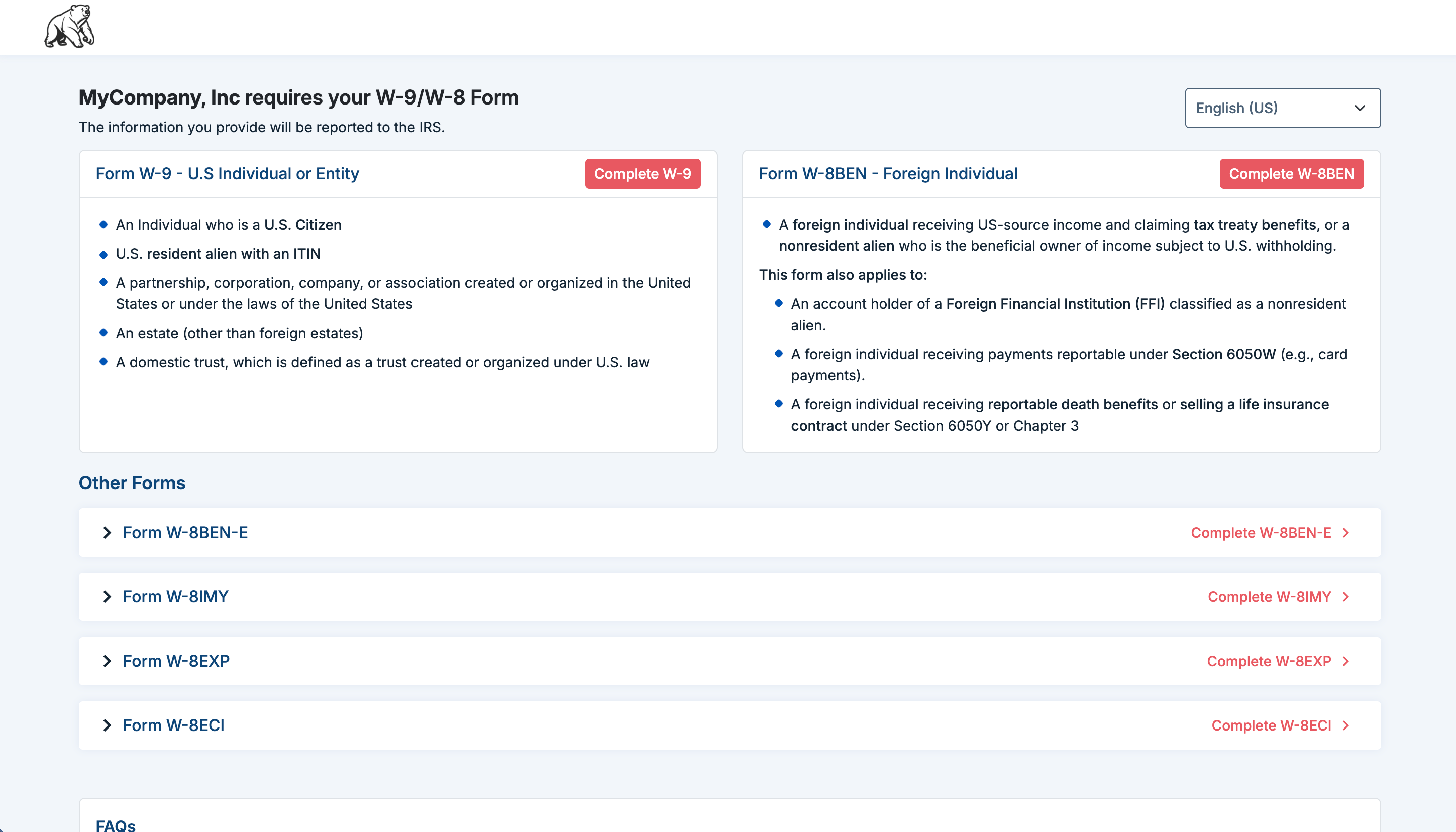
Participants complete their tax form on a secure hosted page inside the referral or affiliate portal on web or mobile.
The secure hosted page where a participant completes a W-9 or W-8 form.
## File 1099 forms at year-end
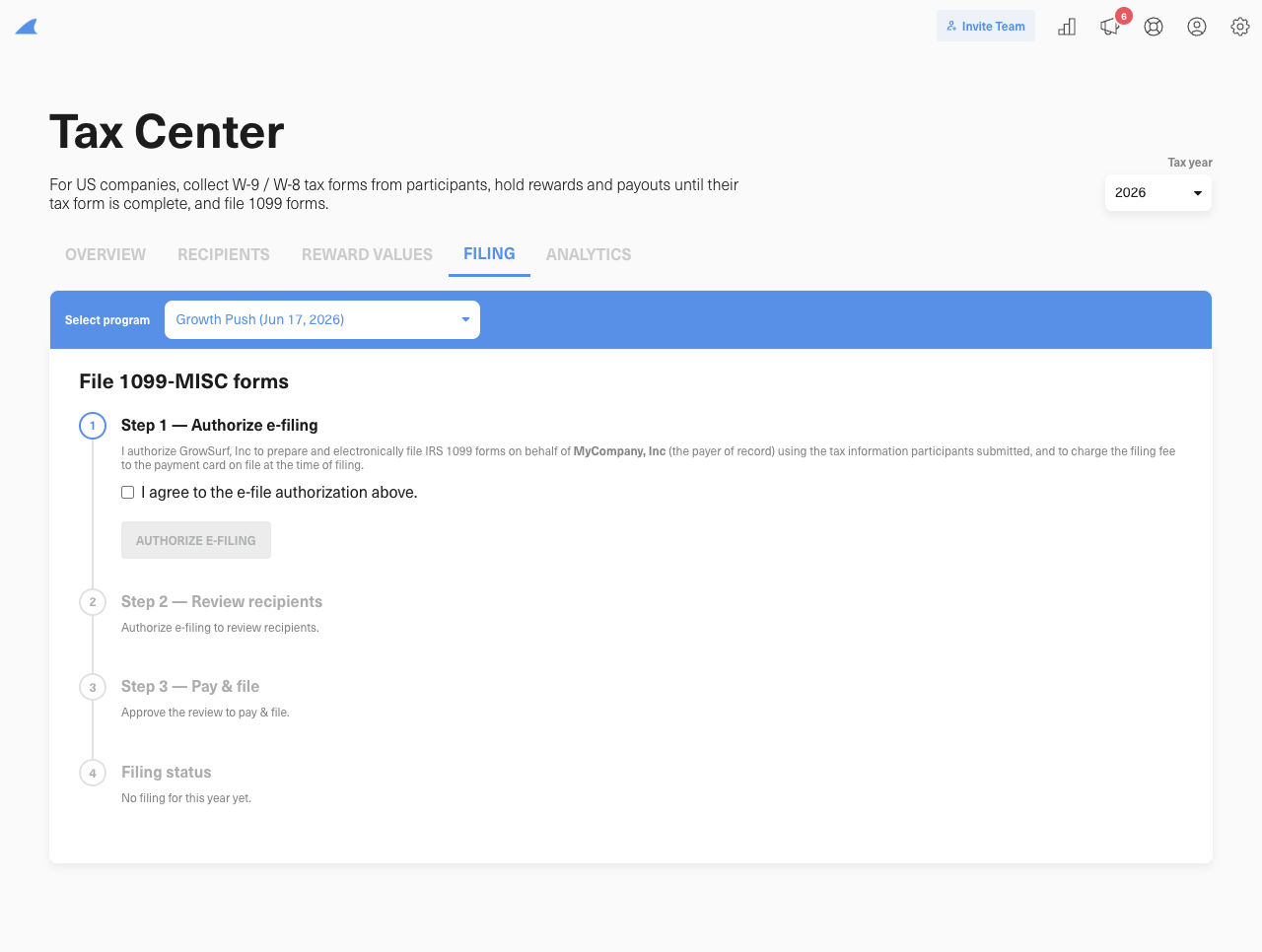
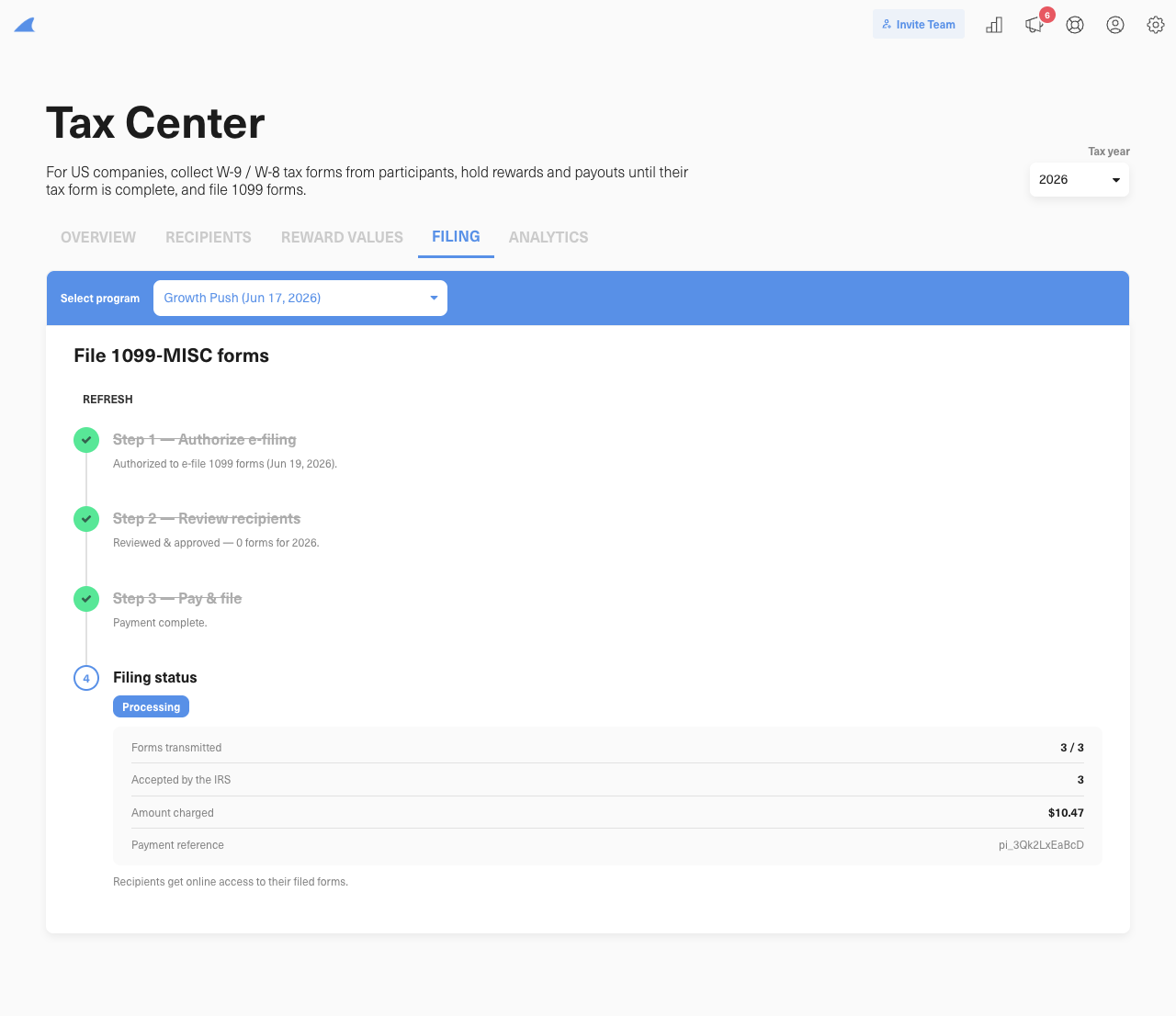
After the tax year ends, open the **Filing** tab in the Tax Center. Select the payer, tax year, and form type, then follow these four steps.
See the step-by-step filing walkthrough
{% stepper %}
{% step %}
**1. Authorize e-filing**
Authorize GrowSurf to prepare and e-file 1099 forms for this payer. You remain the payer of record.
{% endstep %}
{% step %}
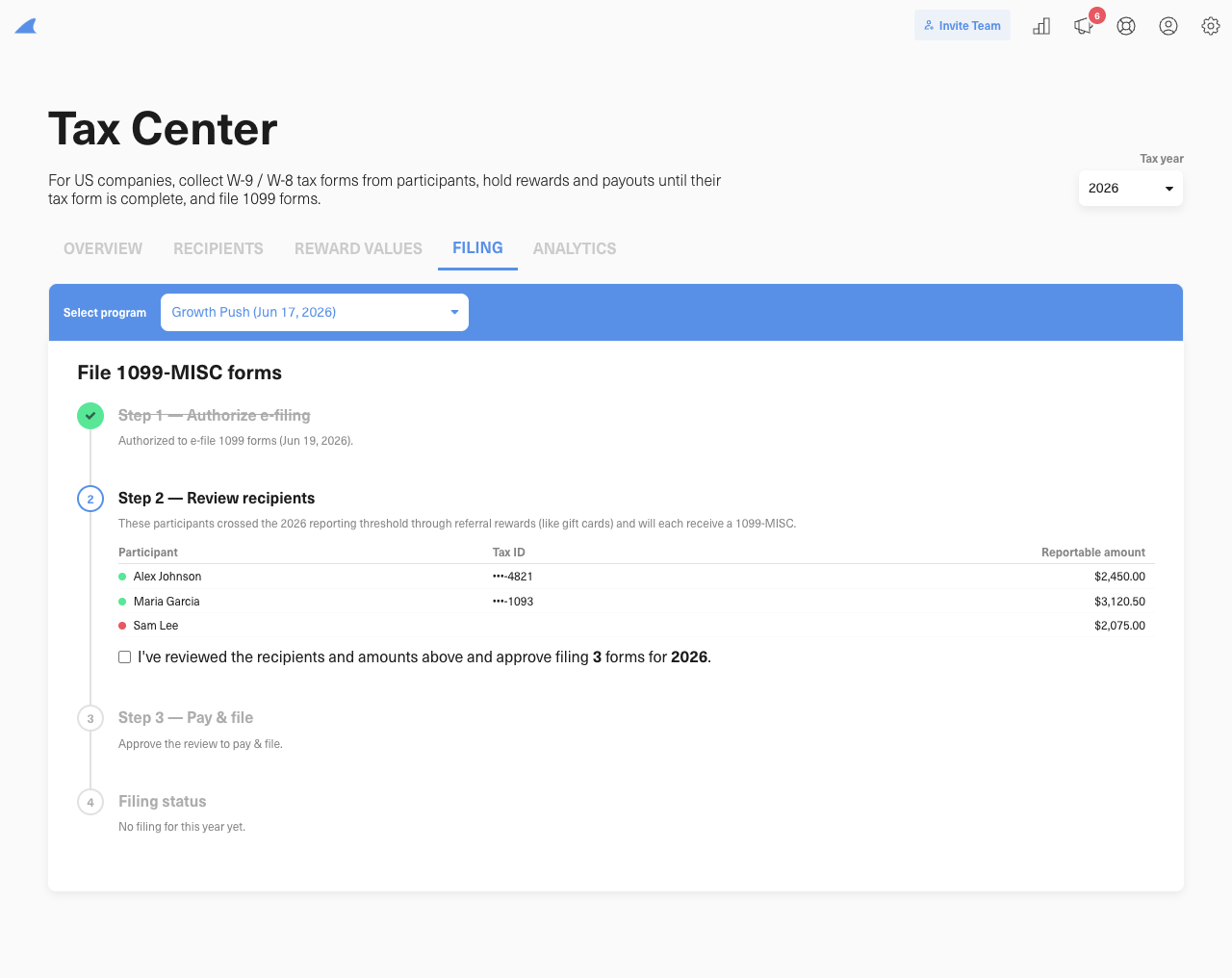
**2. Review recipients**
Review each recipient and reportable amount. GrowSurf combines eligible amounts from programs that use the same payer and form type. Form 1099-NEC and Form 1099-MISC have separate reviews because their totals and thresholds are separate.
{% endstep %}
{% step %}
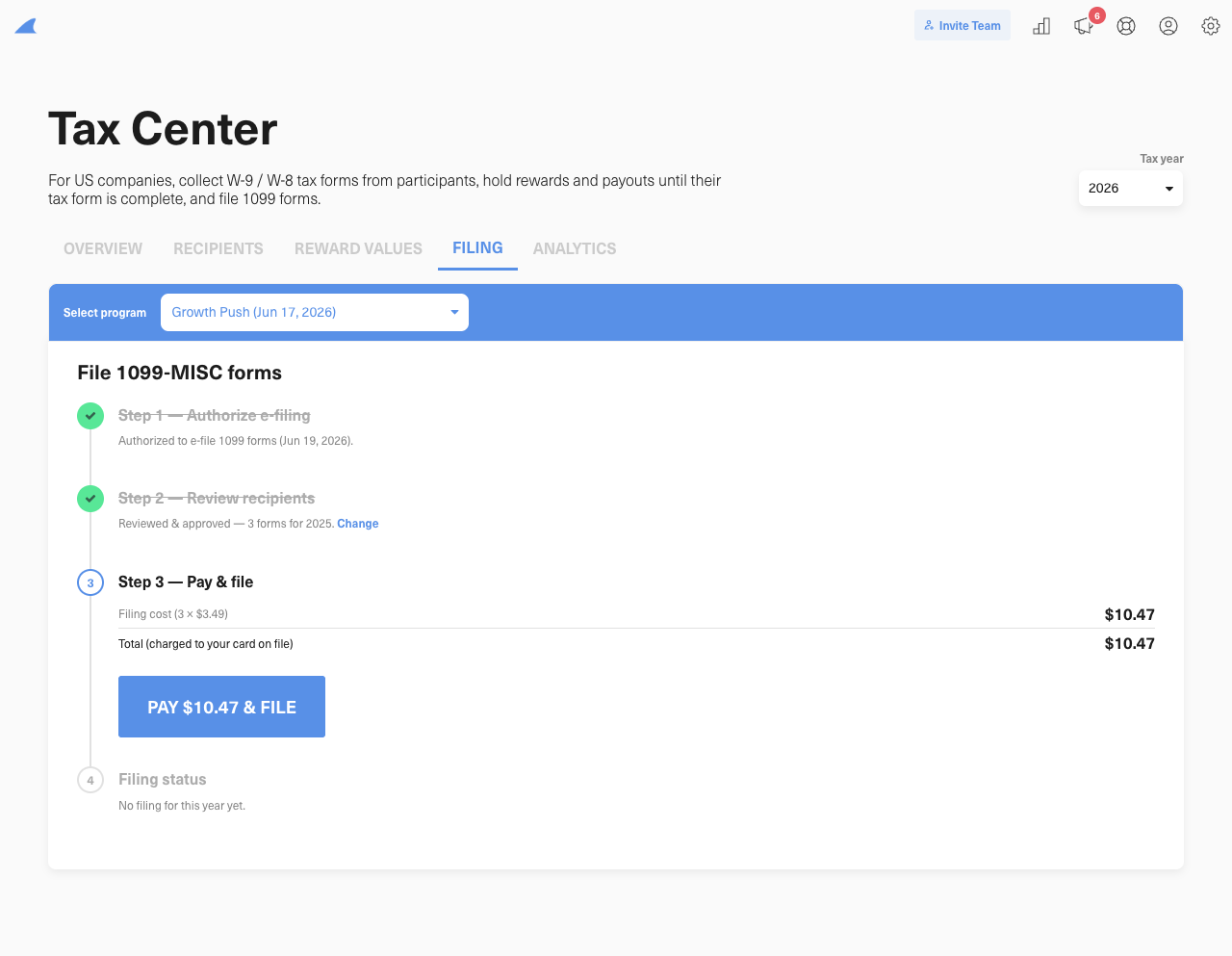
**3. Pay and file**
Approve the filing and pay **$4 per form** with the card on file in your GrowSurf account. GrowSurf does not transmit the forms until the charge succeeds.
{% endstep %}
{% step %}
**4. Track filing status**
Track transmission and IRS acceptance, then download the payer copies. Recipients get online access to their filed forms.
{% endstep %}
{% endstepper %}
## How tax data is stored
GrowSurf does not store the full SSN or tax ID that a participant enters. Our tax provider stores the full value. GrowSurf stores masked details, such as the last four digits, plus the form type and status needed to manage rewards and filings.
IRS TIN matching is optional. When it is enabled, a participant must pass the tax ID check before their form is complete.
## Tax reference
Which tax treatment applies?
GrowSurf asks why the person was paid, then derives the usual filing result.
| Tax treatment | What it means | Usual result |
| --------------- | --------------------------------------------------------------------------------------- | ------------------------------------- |
| Services | Payment for work or services, including commissions and some professional referral fees | Form 1099-NEC candidate |
| Prize or award | A prize or award that was not payment for services | Form 1099-MISC, box 3 candidate |
| Other income | Other reportable income that was not payment for services | Form 1099-MISC, box 3 candidate |
| Purchase rebate | A price adjustment tied to the recipient's own purchase | Not included on a GrowSurf-filed 1099 |
| Needs review | A reward whose treatment is unclear | Review before filing |
Affiliate programs usually start with **Services**. Referral programs usually start with **Prize or award**. Confirm unusual arrangements with your tax advisor. The [IRS instructions for Forms 1099-MISC and 1099-NEC](https://www.irs.gov/instructions/i1099mec) explain the distinction between services and non-service prizes or awards.
Thresholds and multiple programs
For payments made in 2025, the general threshold is $600. For payments made in 2026, it is $2,000. The IRS will adjust the amount for inflation after 2026. See the [IRS instructions for Forms 1099-MISC and 1099-NEC](https://www.irs.gov/instructions/i1099mec).
These are payment-year thresholds. For example, a 2025 payment keeps the $600 threshold even if you file its form in 2026.
The threshold applies separately to Form 1099-NEC and Form 1099-MISC. GrowSurf combines amounts from programs that use the same payer EIN only when those amounts belong on the same form type.
For example, $500 of Form 1099-NEC payments and $1,500 of Form 1099-MISC payments do not combine. If both amounts belong on Form 1099-NEC, they combine to $2,000 and meet the 2026 threshold.
How GrowSurf values rewards
GrowSurf uses the actual cash payout, gift card face value, commission, or fixed credit when that value is available. A Stripe percentage discount can use the subscription value captured when the reward was issued. If GrowSurf cannot determine a value, set the reward's fair-market value in US dollars.
Card payments and unrecognized processors stay outside automatic filing because another processor may report them. Rewards recorded as **Other** need review before filing. Pending, reversed, refunded, and purchase-rebate amounts do not count toward a GrowSurf-filed 1099.
Foreign recipients
A foreign individual completes Form W-8BEN. A foreign entity completes Form W-8BEN-E. GrowSurf excludes a completed W-8 recipient from its Form 1099-NEC and Form 1099-MISC filings.
That exclusion does not settle every US tax question. The source and type of income matter. Services performed outside the US are generally foreign-source income. Some US-source payments to foreign recipients may require withholding and Form 1042-S.
GrowSurf does not file Form 1042-S, so confirm these payments with your tax advisor. See the IRS guidance on [personal service income](https://www.irs.gov/individuals/international-taxpayers/source-of-income-personal-service-income) and [withholding for foreign persons](https://www.irs.gov/forms-pubs/about-publication-515).
PayPal and Venmo payouts
GrowSurf counts eligible payouts sent to PayPal and Venmo accounts toward your Form 1099-NEC or Form 1099-MISC totals. Affiliate commissions count toward Form 1099-NEC; referral rewards use the treatment you selected. Purchase rebates stay outside these filing totals.
When your tax-document policy requires a form, the recipient must complete it before GrowSurf sends the payout.
You remain responsible for your filing obligations. Confirm them with your tax advisor.
## Pricing and responsibility
GrowSurf charges **$4 for each 1099 form you submit**. A Form 1099-NEC and Form 1099-MISC for the same recipient are two forms and have two fees. If a form cannot be filed, GrowSurf credits that form's fee to your account for a future invoice. Filing fees are non-refundable after transmission.
You remain the payer of record. You are responsible for the accuracy and timing of tax forms and filings. See the GrowSurf [Terms of Service](https://growsurf.com/terms) and [Payment and Refund Policy](https://support.growsurf.com/article/386-what-is-growsurfs-payment-and-refund-policy).
---
# Agent Instructions
This documentation is published with GitBook. GitBook is the documentation platform designed so that both humans and AI agents can read, navigate, and reason over technical content effectively. Learn more at gitbook.com.
## Querying This Documentation
If you need additional information that is not directly available in this page, you can query the documentation by asking a question.
Perform an HTTP GET request on the following URL with the `ask` and `goal` query parameters:
```
GET https://docs.growsurf.com/compliance/tax-forms-and-1099-filing.md?ask=&goal=
```
`ask` is the immediate question: it should be specific, self-contained, and written in natural language.
`goal` is what the user is ultimately trying to achieve, the reason they need the answer. Sharing it helps GitBook give you a better, more relevant answer. A goal is most helpful when it describes the outcome the user wants rather than restating the question. For example, with `ask=how do I create an API token`, a goal like `automate deployments from our CI pipeline` lets GitBook tailor the answer to that use case.
The response will contain a direct answer to the question and relevant excerpts and sources from the documentation.
Use this mechanism when the answer is not explicitly present in the current page, you need clarification or additional context, or you want to retrieve related documentation sections.