> For the complete documentation index, see [llms.txt](https://docs.growsurf.com/llms.txt). Markdown versions of documentation pages are available by appending `.md` to page URLs; this page is available as [Markdown](https://docs.growsurf.com/integrations/stripe/stripe-marketplace.md).

# Stripe Marketplace app

See referrals, referred revenue, and program activity in your Stripe Dashboard.

See who referred a customer, what they paid, and how your GrowSurf programs are doing without leaving Stripe.

{% hint style="info" %}
Install GrowSurf from the [Stripe App Marketplace](https://marketplace.stripe.com/apps/growsurf). You sign in with a GrowSurf account, so start a free trial first if you don't have one. The existing [Stripe integration](/integrations/stripe.md) keeps working as before.
{% endhint %}

## Connect your team and programs

{% stepper %}
{% step %}
**Install the app**

Open [GrowSurf on the Stripe App Marketplace](https://marketplace.stripe.com/apps/growsurf), choose *Install app*, pick the Stripe account, and review the permissions. Stripe then opens the app in your Dashboard.
{% endstep %}

{% step %}
**Sign in to GrowSurf**

Open GrowSurf in Stripe and choose *Sign in to GrowSurf*. In the GrowSurf tab, choose your team and programs, then choose *Confirm connection*. Each person signs in with their own GrowSurf account.

<figure><img src="https://2794996218-files.gitbook.io/~/files/v0/b/gitbook-x-prod.appspot.com/o/spaces%2F-LeklWo0yn03AhWro2Ux%2Fuploads%2Fgit-blob-b6246f09486cb17f7603521778aa508e35f1a2ae%2Fstripe-marketplace-sign-in.png?alt=media" alt="GrowSurf in Stripe with the Sign in to GrowSurf button" width="320"><figcaption><p>Sign in to GrowSurf from Stripe.</p></figcaption></figure>
{% endstep %}

{% step %}
**Enter your confirmation code**

GrowSurf shows an 8-character code. Enter it in Stripe and choose *Finish connecting*. The code expires in 10 minutes. Enter it only in your own Stripe Dashboard.
{% endstep %}

{% step %}
**Wait for setup to finish**

Until GrowSurf receives the next activity from your Stripe account, such as a new customer or payment, the app shows *Finishing setup* for your programs.
{% endstep %}
{% endstepper %}

Each Stripe account and mode links to one GrowSurf team. Live, test, and sandbox connections are separate. Use *Select programs* in the app's settings to add programs later.

## Turn on payment tracking

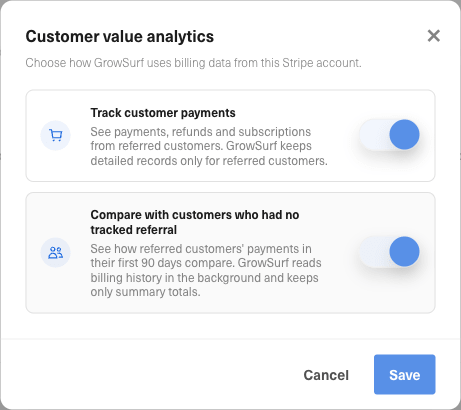
Connecting does not track payments. In the app, choose *Turn on* next to a program under *Revenue*. This opens the program's Stripe integration in GrowSurf, where you turn on *Track customer payments*. Referred revenue starts with the next payment.

<figure><img src="https://2794996218-files.gitbook.io/~/files/v0/b/gitbook-x-prod.appspot.com/o/spaces%2F-LeklWo0yn03AhWro2Ux%2Fuploads%2Fgit-blob-08504f632194ea0a2e23610bff189d3915d02d94%2Fstripe-marketplace-payment-tracking.png?alt=media" alt="Customer value analytics settings with Track customer payments turned on" width="461"><figcaption><p>Turn on payment tracking in GrowSurf.</p></figcaption></figure>

## What you see

* The app's overview shows each program's referred revenue, MRR, and paying customers, your top referrers, and items that need your attention, such as rewards waiting for approval or affiliate applications to review. Each item has a *Review* link that opens the list in GrowSurf.
* The full page has *Overview*, *Revenue*, *Engagement*, and *Activity* tabs for the date range and currency you choose. Pick one program for MRR changes, purchases, and retention.
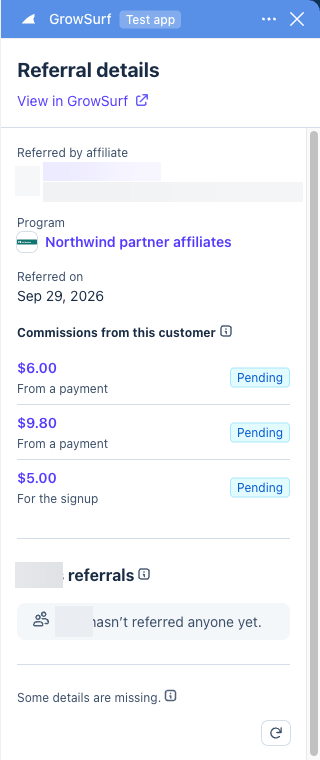
* On a customer, payment, invoice, or subscription, *Referral details* shows who referred it, the reward or commission it earned, and what the customer paid.

Links open the matching participant, reward, or commission in GrowSurf.

<figure><img src="https://2794996218-files.gitbook.io/~/files/v0/b/gitbook-x-prod.appspot.com/o/spaces%2F-LeklWo0yn03AhWro2Ux%2Fuploads%2Fgit-blob-6dbe597920647173f6597a4e7e894220b93b7096%2Fstripe-marketplace-overview.png?alt=media" alt="GrowSurf&#x27;s overview in Stripe showing sample referred revenue, paying customers, referred MRR, and top referrers" width="320"><figcaption><p>The overview with sample data.</p></figcaption></figure>

<figure><img src="https://2794996218-files.gitbook.io/~/files/v0/b/gitbook-x-prod.appspot.com/o/spaces%2F-LeklWo0yn03AhWro2Ux%2Fuploads%2Fgit-blob-f03fcc18f50351aadf77437e7780414a885351df%2Fstripe-marketplace-referral-details.png?alt=media" alt="Referral details for a Stripe customer showing the program and commissions, with personal details hidden" width="320"><figcaption><p>See referral details on a Stripe customer.</p></figcaption></figure>

| Value            | What it means                                                                  |
| ---------------- | ------------------------------------------------------------------------------ |
| Referred revenue | What referred customers paid in the date range, minus refunds and disputes.    |
| Referred MRR     | Monthly recurring revenue from referred customers' active subscriptions today. |
| Paying customers | Referred customers who paid at least once in the date range.                   |
| Commissions      | Commissions earned on those payments, whether pending, approved, or paid.      |

GrowSurf leaves out a number it can't confirm instead of showing 0. Payment figures start when payment tracking began. Amounts are not your Stripe balance or payouts.

## Access and permissions

Installing the app does not give other Stripe users access to your GrowSurf team. Each person's GrowSurf role controls which programs, participants, and analytics they see. The app only shows GrowSurf data. It doesn't move money.

## In the Program Editor

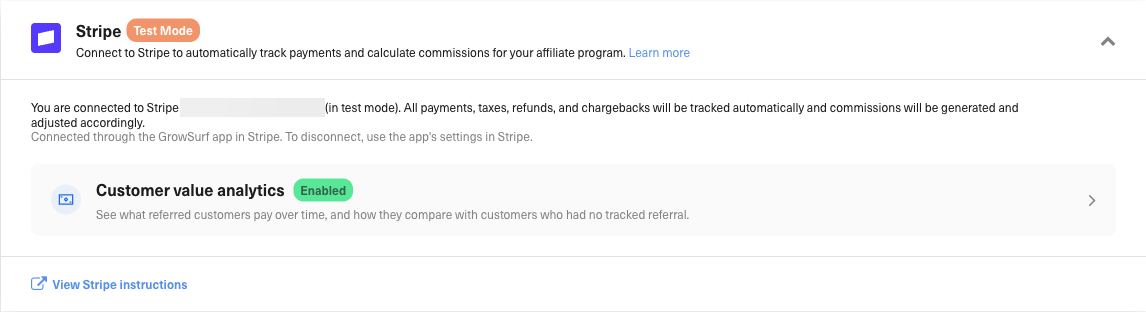
A program connected through the app shows *Connected through the GrowSurf app in Stripe* on its Stripe integration. Its mode follows the Stripe account you connected, and you disconnect it from the app. After the app disconnects a program, you can connect it again from GrowSurf with *Connect to Stripe*.

<figure><img src="https://2794996218-files.gitbook.io/~/files/v0/b/gitbook-x-prod.appspot.com/o/spaces%2F-LeklWo0yn03AhWro2Ux%2Fuploads%2Fgit-blob-bcf6c254794c742c3bbf19b120f25ec20d13e444%2Fstripe-marketplace-editor-connection.png?alt=media" alt="The Stripe integration in GrowSurf showing Connected through the GrowSurf app in Stripe, with the account ID hidden"><figcaption><p>A program connected through the GrowSurf app in Stripe.</p></figcaption></figure>

## Sign out, disconnect, or uninstall

* *Sign out* signs out only you. The team's programs stay connected.
* *Disconnect* removes one program. *Disconnect team* removes every program and signs everyone out. Both need management permission. Your GrowSurf data stays.
* Uninstalling removes the app's access to Stripe.

<figure><img src="https://2794996218-files.gitbook.io/~/files/v0/b/gitbook-x-prod.appspot.com/o/spaces%2F-LeklWo0yn03AhWro2Ux%2Fuploads%2Fgit-blob-06b49af708c54805b22d34d829c66dbcaac96663%2Fstripe-marketplace-program-settings.png?alt=media" alt="GrowSurf app settings in Stripe showing Select programs, individual program connection status, Disconnect, and Disconnect team"><figcaption><p>Manage connected programs in the app's settings.</p></figcaption></figure>

{% hint style="warning" %}
Disconnect before you uninstall, so GrowSurf can remove the discounts it set up while it still has Stripe access. Contact support if you already uninstalled.
{% endhint %}

## Troubleshooting

| What you see                 | What to check                                                |
| ---------------------------- | ------------------------------------------------------------ |
| Finishing setup              | Wait for new activity in your Stripe account, then refresh.  |
| Turn on                      | Payment tracking is off for that program. Choose *Turn on*.  |
| Starts with the next payment | Tracking is on. Figures appear after the next payment.       |
| No programs you can view     | Ask a GrowSurf team admin for program access.                |
| Code didn't work or expired  | Choose *Start again* for a new code.                         |
| Couldn't reach GrowSurf      | Try again. If it keeps happening, sign out and sign back in. |

Still stuck? Contact [GrowSurf support](mailto:support@growsurf.com) with the Stripe account ID, program, mode, and time of the issue. Never send API keys, passwords, or card details.


---

# Agent Instructions
This documentation is published with GitBook. GitBook is the documentation platform designed so that both humans and AI agents can read, navigate, and reason over technical content effectively. Learn more at gitbook.com.

## Querying This Documentation
If you need additional information that is not directly available in this page, you can query the documentation by asking a question.

Perform an HTTP GET request on the following URL with the `ask` and `goal` query parameters:

```
GET https://docs.growsurf.com/integrations/stripe/stripe-marketplace.md?ask=<question>&goal=<user_goal>
```

`ask` is the immediate question: it should be specific, self-contained, and written in natural language.
`goal` is what the user is ultimately trying to achieve, the reason they need the answer. Sharing it helps GitBook give you a better, more relevant answer. A goal is most helpful when it describes the outcome the user wants rather than restating the question. For example, with `ask=how do I create an API token`, a goal like `automate deployments from our CI pipeline` lets GitBook tailor the answer to that use case.

The response will contain a direct answer to the question and relevant excerpts and sources from the documentation.

Use this mechanism when the answer is not explicitly present in the current page, you need clarification or additional context, or you want to retrieve related documentation sections.